Feature
Mobile website testing
Follow a user journey across mobile sizes and record what needs fixing.
Explore featureFree pre-launch checklist and mobile QA examples
Use this website launch checklist to review content, links, forms, SEO and mobile layouts. Download the template and test key user flows in Mobile Viewer.
Free browser extension · No account required · Runs on your computer
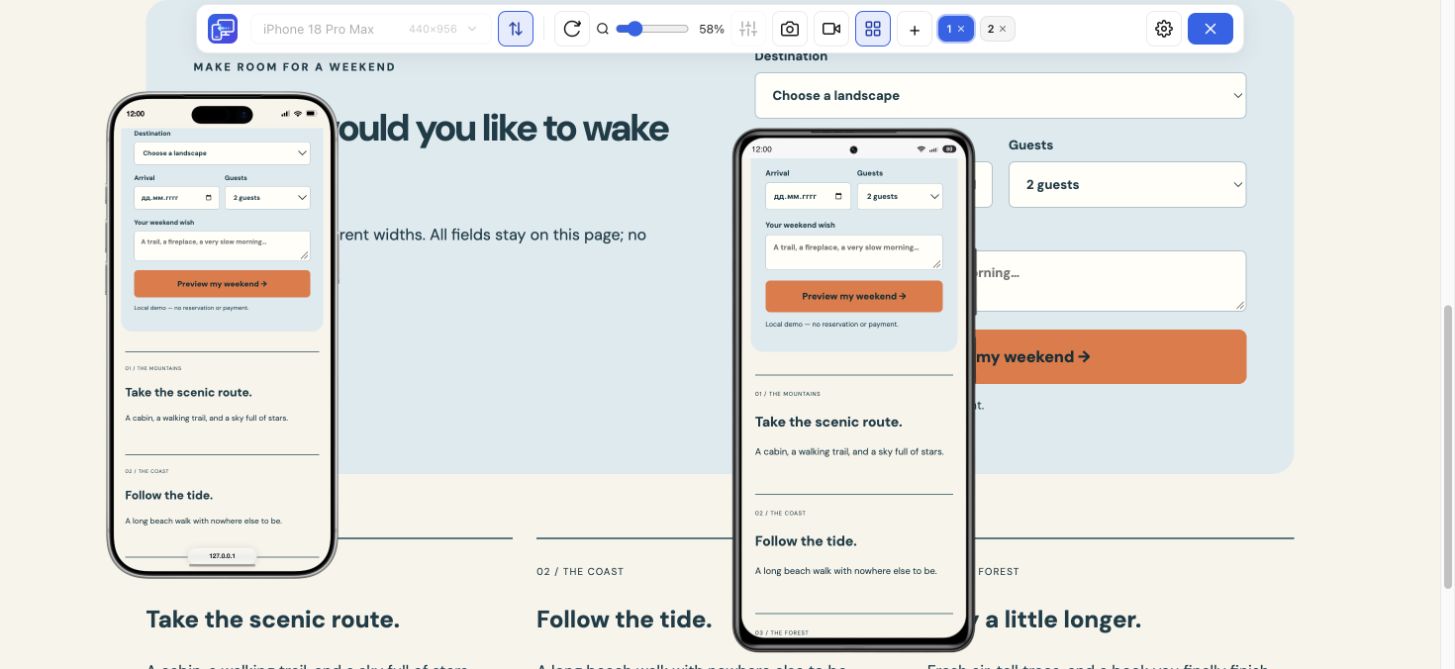 Mobile form checkSee the validation example
Fill in the staging URL, production URL, launch date and approval owner at the top of the website launch checklist. Use the Pass condition to record Pass, Fail or N/A, then attach evidence for any blocker. Hold the launch or review rollback if any of these failures affects your release.
WEBSITE LAUNCH CHECKLIST

Project:
Staging URL:
Production URL:
Launch date:
Approval owner:

Record Pass, Fail or N/A. Add an owner and evidence for each blocker.

HOLD LAUNCH OR REVIEW ROLLBACK IF:
- The main form reports success, but its submission never reaches the inbox or CRM.
- A key production page returns an error, points to staging or carries an unintended noindex directive.
- Visitors cannot complete the primary journey on a supported device or browser.

BEFORE LAUNCH
- Content
  Action: Open one page per template and compare contact details and offers with the approved copy.
  Pass if: The details match the approved source and no placeholder copy or assets remain.
  Status / owner / evidence:
- Links
  Action: Follow the header and footer links, open a download and request a made-up URL.
  Pass if: Links and downloads reach their intended targets. The missing URL returns HTTP 404 and offers a way back.
  Status / owner / evidence:
- Forms
  Action: Send a submission with a unique test ID. Check the destination inbox or CRM.
  Pass if: The visitor gets confirmation and the test ID arrives once in the correct destination.
  Status / owner / evidence:
- Key flows
  Action: Complete the main signup, booking or checkout with a test account.
  Pass if: The visitor gets confirmation and the expected record appears in the system that processes it.
  Status / owner / evidence:
- Mobile layout
  Action: Run the menu, primary action and form checks below on representative screen sizes.
  Pass if: Each applicable task can be completed and the expected state is shown.
  Status / owner / evidence:
- Accessibility
  Action: Use Tab and Shift+Tab through the main flow, then zoom in and check the form and navigation.
  Pass if: Focus is visible, labels stay readable and controls remain reachable.
  Status / owner / evidence:
- Target browsers
  Action: Repeat the primary touch flow on a real phone in a browser your audience uses.
  Pass if: The keyboard, sticky controls and dialogs allow the user to finish the task.
  Status / owner / evidence:
- SEO
  Action: Inspect the declared canonical on a key template. For a migration, also test a mapped old path.
  Pass if: The canonical points to the intended production URL. A mapped path redirects to the equivalent page.
  Status / owner / evidence:
- Performance
  Action: Repeat a cold load at the same mobile network setting as the approved baseline.
  Pass if: Time until the primary action is usable stays within the agreed budget. Late content does not move it as the visitor tries to tap.
  Status / owner / evidence:

AT LAUNCH
- Production URL
  Action: Open the site over HTTP and on an alternate hostname, if one is supported.
  Pass if: Both reach the intended HTTPS URL without a certificate error or redirect loop.
  Status / owner / evidence:
- Indexing
  Action: Run URL Inspection’s live test on the homepage and a priority page that should appear in search.
  Pass if: The live test can fetch the URL and indexing is allowed. The canonical points to the intended production URL.
  Status / owner / evidence:
- Live smoke test
  Action: Run one production-safe test through the main journey. Check the destination record and analytics debug view.
  Pass if: The expected record arrives. With analytics consent granted, the success event fires once after completion.
  Status / owner / evidence:
- Rollback
  Action: Find the last known-good release and confirm who can restore it.
  Pass if: The owner can identify the restore steps and the signal that triggers them.
  Status / owner / evidence:

AFTER LAUNCH
- Errors
  Action: Review production error logs and high-traffic 404s after real visits arrive.
  Pass if: There is no new widespread error on a key route. Broken links from old URLs have an owner.
  Status / owner / evidence:
- Conversions
  Action: Match a known enquiry or order with its destination record and success event.
  Pass if: The destination record exists and the event count matches the completed action.
  Status / owner / evidence:
- Search
  Action: Submit the production sitemap and review priority URLs as Search Console data becomes available.
  Pass if: The sitemap can be read and priority URLs with an unexpected indexing issue have an owner.
  Status / owner / evidence:
- Sign-off
  Action: Review every failed item and record the approval decision.
  Pass if: Blocking items are resolved. Accepted exceptions have an owner and a follow-up date.
  Status / owner / evidence:

MOBILE WEBSITE TESTING
- Navigation
  Action: Open the menu and follow the last link.
  Pass if: The last link is reachable and opens its destination. Closing the menu with the keyboard returns focus to its trigger.
  Status / owner / evidence:
- Primary action
  Action: Select a product variant and open the cart.
  Pass if: The button is reachable and the cart shows the selected variant.
  Status / owner / evidence:
- Form
  Action: Leave the email blank, submit, then correct the error and resubmit.
  Pass if: The error identifies the field, entered values are preserved and the corrected submission confirms success.
  Status / owner / evidence:

Issue / viewport / status / owner / evidence:
Retest / approval:Run this website launch QA checklist on staging. Pick one URL per important page template and identify the user journeys that must pass before release.
| Check | Action | Pass condition |
|---|---|---|
| Content | Open one page per template and compare contact details and offers with the approved copy. | The details match the approved source and no placeholder copy or assets remain. |
| Links | Follow the header and footer links, open a download and request a made-up URL. | Links and downloads reach their intended targets. The missing URL returns HTTP 404 and offers a way back. |
| Forms | Send a submission with a unique test ID. Check the destination inbox or CRM. | The visitor gets confirmation and the test ID arrives once in the correct destination. |
| Key flows | Complete the main signup, booking or checkout with a test account. | The visitor gets confirmation and the expected record appears in the system that processes it. |
| Mobile layout | Run the menu, primary action and form checks below on representative screen sizes. | Each applicable task can be completed and the expected state is shown. |
| Accessibility | Use Tab and Shift+Tab through the main flow, then zoom in and check the form and navigation. | Focus is visible, labels stay readable and controls remain reachable. |
| Target browsers | Repeat the primary touch flow on a real phone in a browser your audience uses. | The keyboard, sticky controls and dialogs allow the user to finish the task. |
| SEO | Inspect the declared canonical on a key template. For a migration, also test a mapped old path. | The canonical points to the intended production URL. A mapped path redirects to the equivalent page. |
| Performance | Repeat a cold load at the same mobile network setting as the approved baseline. | Time until the primary action is usable stays within the agreed budget. Late content does not move it as the visitor tries to tap. |
Repeat these checks on the live domain in a signed-out browser. Record the tested URLs and the evidence before signing off.
| Check | Action | Pass condition |
|---|---|---|
| Production URL | Open the site over HTTP and on an alternate hostname, if one is supported. | Both reach the intended HTTPS URL without a certificate error or redirect loop. |
| Indexing | Run URL Inspection’s live test on the homepage and a priority page that should appear in search. | The live test can fetch the URL and indexing is allowed. The canonical points to the intended production URL. |
| Live smoke test | Run one production-safe test through the main journey. Check the destination record and analytics debug view. | The expected record arrives. With analytics consent granted, the success event fires once after completion. |
| Rollback | Find the last known-good release and confirm who can restore it. | The owner can identify the restore steps and the signal that triggers them. |
Compare the new release with your pre-launch baseline. Reopen the release decision when a blocking failure appears.
| Check | Action | Pass condition |
|---|---|---|
| Errors | Review production error logs and high-traffic 404s after real visits arrive. | There is no new widespread error on a key route. Broken links from old URLs have an owner. |
| Conversions | Match a known enquiry or order with its destination record and success event. | The destination record exists and the event count matches the completed action. |
| Search | Submit the production sitemap and review priority URLs as Search Console data becomes available. | The sitemap can be read and priority URLs with an unexpected indexing issue have an owner. |
| Sign-off | Review every failed item and record the approval decision. | Blocking items are resolved. Accepted exceptions have an owner and a follow-up date. |
Use this responsive QA checklist before launch to follow the path a visitor actually takes. Open the menu, follow the primary action and complete the form or checkout with test data. Compare a narrow phone, a wider phone and a tablet, keeping the route and state consistent.
| Check | Action | Pass condition |
|---|---|---|
| Navigation | Open the menu and follow the last link. | The last link is reachable and opens its destination. Closing the menu with the keyboard returns focus to its trigger. |
| Primary action | Select a product variant and open the cart. | The button is reachable and the cart shows the selected variant. |
| Form | Leave the email blank, submit, then correct the error and resubmit. | The error identifies the field, entered values are preserved and the corrected submission confirms success. |
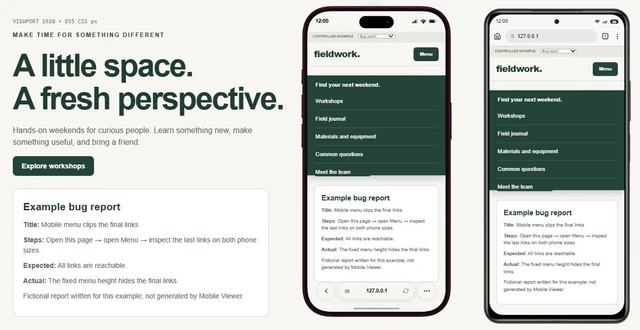
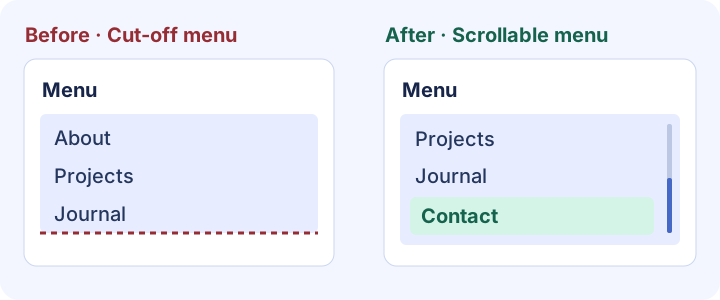
At 375 × 667 CSS px, open a long menu and try to reach the last link. In the failing state, the menu extends below the available height. After the fix, the menu scrolls, the last destination can be opened and focus returns to the trigger when the menu closes.
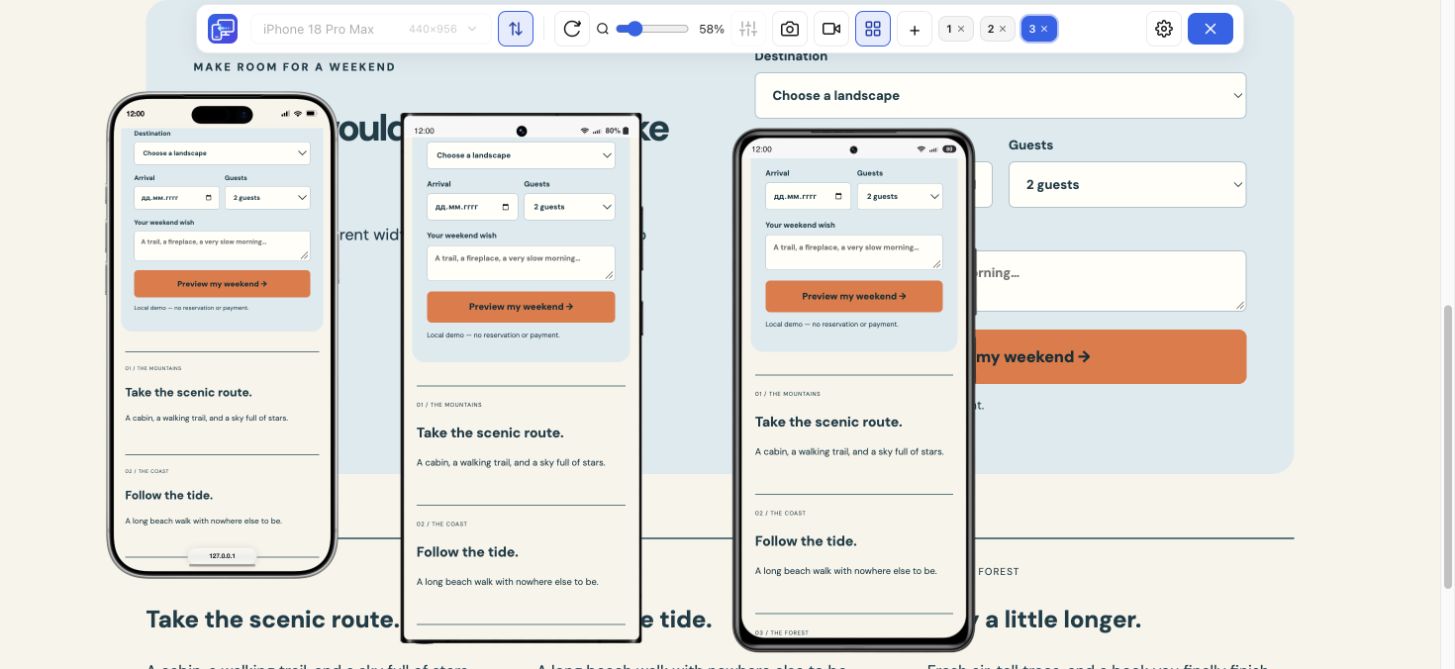
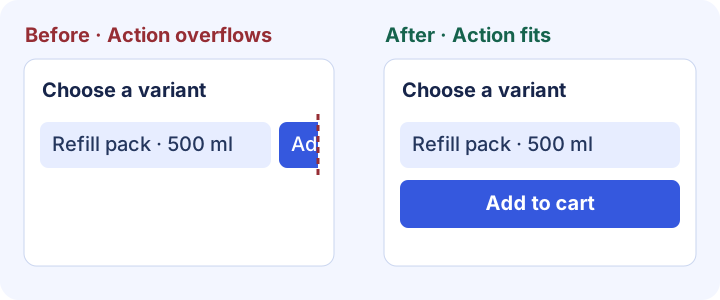
At 390 × 844 CSS px, choose a product variant with a long label and try to add it to the cart. In the failing state, the controls sit on one row and the action overflows. After the fix, the controls stack and the cart shows the chosen variant.
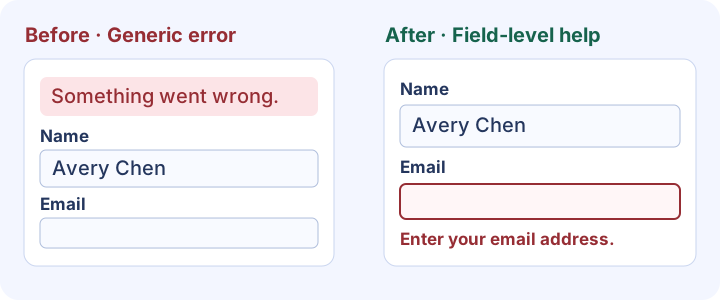
At 390 × 844 CSS px, submit with the email field empty. In the failing state, a generic banner leaves the user to guess which field failed. After the fix, the email field shows a specific error, the entered name remains, and a corrected submission reaches confirmation. Verify keyboard behavior and delivery on the target browser and live site.
Example sign-off entry. Mobile menu · Fail · QA owner · At 375 × 667 portrait, the last link is cut off when the menu is open. Attach a screenshot and assign a fix. Retest at the same size and record whether the link opens and focus returns to the trigger.
Download or copy the template, assign a reviewer and mark which user flows can block the release.
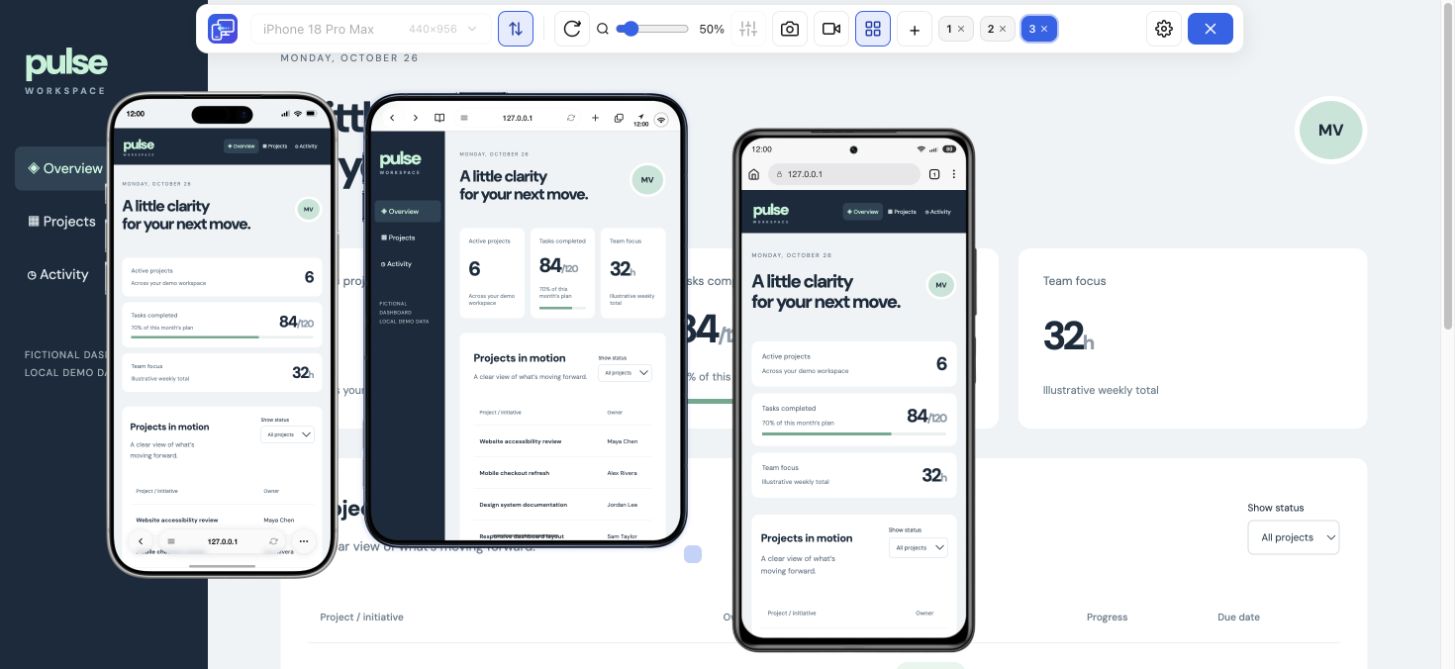
Open the staging URL in desktop Chrome and add multiple sizes in Mobile Viewer. Repeat the same menu, primary action and form checks across them.
Keep the viewport, actions and evidence with each failure. Retest after fixing it and record the final status.
Cover content, links, forms, key user flows, mobile layout, accessibility, SEO and performance before launch. Retest key actions, crawl settings and analytics on production, then record sign-off.
The PDF includes all 20 checks, including the three mobile scenarios, plus space to record status, owners and evidence. Use the copyable template if your team works in a ticket or shared document.
Test the same navigation, primary action and form at several widths. Record the size, page state, expected result and evidence. Verify browser-specific interactions on the intended devices.
Open your staging site, compare phone and tablet sizes, then save evidence for any issue that could block launch.
Install extensionChrome Web StoreFreeFree browser extension · No account required · Runs on your computer
Feature
Follow a user journey across mobile sizes and record what needs fixing.
Explore featureFeature
Inspect layout changes at several screen widths and around your breakpoints.
Explore featureGuide
Copy a report template and describe a website issue someone can reproduce.
Explore guideGuide
Measure your browser and screen in CSS pixels, then copy a report to reproduce a layout issue.
Explore guide